08 October, 2015

Accelerated Mobile Pages

Browsing the web from our phones is nowadays a common thing.  In fact it is now likelier to browse from your phone than from a desktop computer.  Personally, I find myself using a desktop browser only while I'm at work or while doing some desktopy thing (such as coding or messing with VMs and networks).  If I'm just browsing during the evening, for instance, its 99% from my phone.

My preferred way of browsing is via the forum kind of applications, such as reddit or hacker news, so at that point I'm not really using a browser.  However, the majority of the content is delivered from websites so you see and interesting title, tap on it, and the in-app browser or the main browser is opened.  This typically works fine, until the site you're accessing is a megalith and takes tens of seconds to load.  After at most 3 seconds, if barely any content has loaded, the link is forgotten and I move on the the next link.  That's it.

The problem is that these websites are offering too many features for them to be practical on a smartphone.  Sometimes websites take even longer because they need to load the comments section, then come the suggested posts, with ultra big resolution images, followed by the author's biography...  It's unnecessary, I just want to see content.

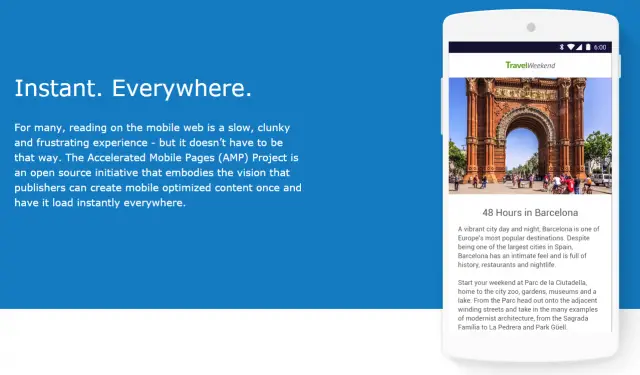
A team of internet companies, including Google, have come up with Accelerated Mobile Pages (AMP).  It is primarily a technological development (not exactly unheard of, as we'll see), but  through its restrictions it tries to limit the amount of unnecessary crap on pages.  As I said, it's a development, however much of this development is in terms of standards and rules rather than faster networks, or something like that.

In fact ,the focus is on basically banning a whole bunch of heavy and also some outdated HTML elements.  Unsurprisingly, no more <applet>, no more <frame> and no more <embed>.  There are also strict limitations on JavaScript, however the most surprising (but great) banned elements are <input> and <form> (with the exception of <button>).  It may not directly impact immediate performance of HTML, but it will surely stop developers from adding useless "post a comment" forms.

The focus is primarily on immediate content.  If I get a link while chatting and I open it up, I don't have more than 3 seconds to read the title and move back to the chat.  Thankfully, on Android, this experience shall now improve with the new chrome tabs introduced in Marshmallow.  It's a technical thing, but basically it avoids having to use either an in-app browser (which is isolated from your standard chrome) or opening up chrome (which is slow).
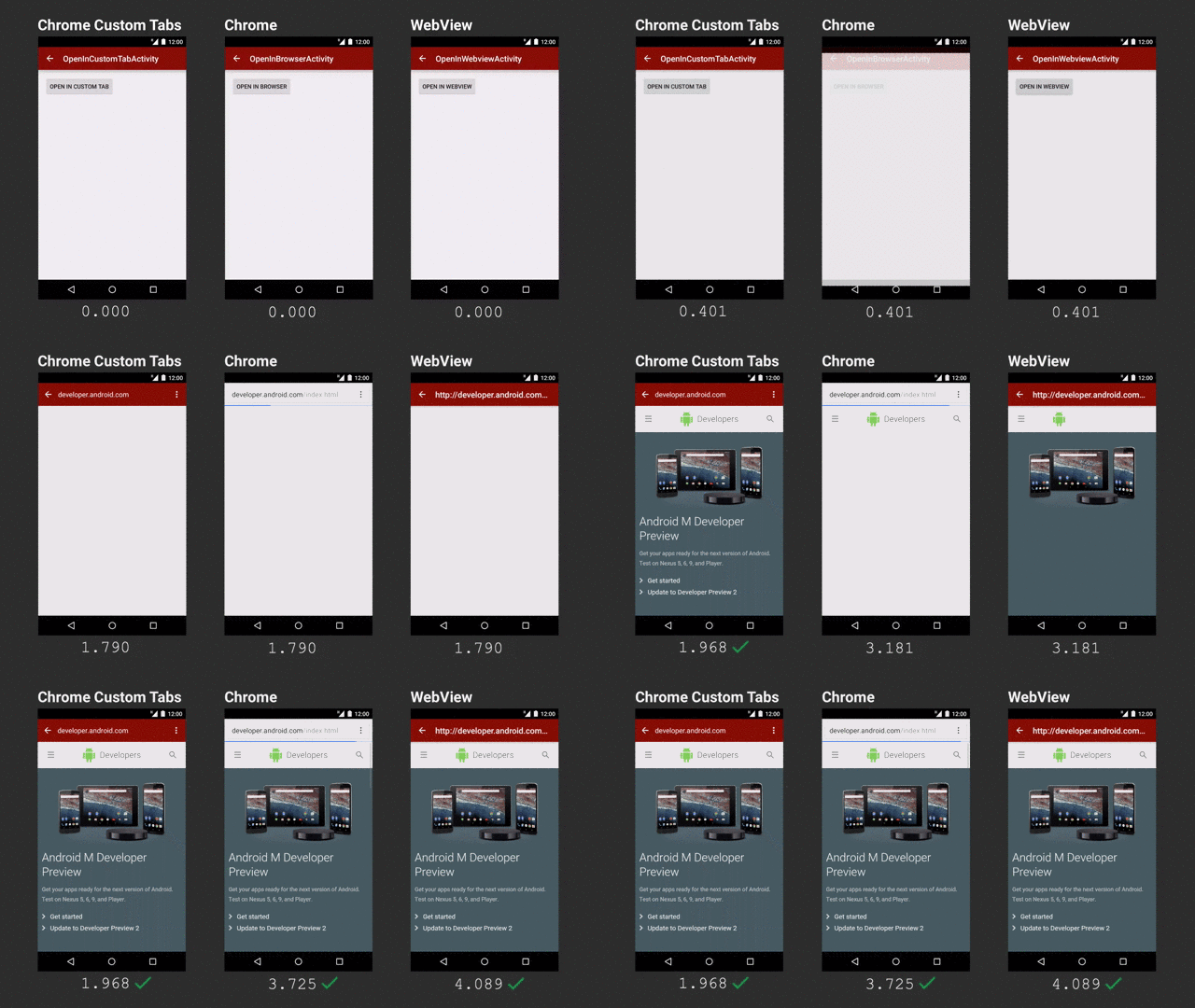
Chrome tabs are much faster, at least in this demo (via Ars Technica)

But let's get back to AMP.  As I said, it is content that the majority wants, so in this age of platform webapps, single-page sites and all the rest, simplicity, again, trumps features.  Despite the lack of features, static areas of a website are hugely important.  If you're interested, here's a short how-to, however it is fair to note that static this time is mostly client side, so no JavaScript - which means you'll probably need server-side processing if you have "dynamic" content.

AMP avoids the common JavaScript the web is used to and realises the idea of Web Components.  These do have JavaScript under the hood, but since they are managed differently, it makes the page load faster without synchronous blocks by JavaScript.  AMP also restricts inline styling, conditional comments and some CSS attributes (although CSS is not so limited compared to JS).

As yet, (being days or hours since being announced) I personally do not consider this as a major breakthrough technologically - it's only a set of rules to reduce the bloat on webpages who primarily host content.  However, I am very glad with the way things are going and I do hope it gains traction.  

The benefits I see are greatly improved user experience with much faster load times and no nonsense web pages along with better development.  The more modular the pages, due to web components, the easier it is to develop.  There are no messy inline styles or randomly placed JavaScript.  Things are put in their place and the rules are strict - otherwise you'll not qualify for AMP and your page won't make it to the top of search results.  

Unfortunately, I don't have that much control on this blog, otherwise I would have AMP'd it right away!

For further details, there are quite some resources:

07 October, 2015

The Volatile Security of Volatile Memory

I forgot about yesterday...
It is the black box in every system, even our brain.  Volatile memory goes by many names, working memory, temporary memory, RAM, even just memory.  Whatever your preference, when you mention it you're most likely referring to the area of a system in which data is stored for a relatively short period of time until it is used and then discarded (or transferred to persistent storage).  One cannot possibly imagine a system without some form of memory; even if it is the same are where it is stored permanently, there is still some area used for temporary calculations.

Among the major differences between RAM and persistent storage is that RAM typically contains data about the processes that are currently in execution along with the data we are working on right now and will be discarded soon (yes I hear your screams, persistent storage does that too, but it also has data that we haven't looked at for months).  Along with this fact, hard disks enjoy the possibility of being totally encrypted.  They cannot be read unless the key is provided.  This is not possible in RAM, primarily because the CPU cannot work with encrypted commands.

I do not mean that the CPU is not able to process encrypted data and convert it to plain text, what I am referring to is the inability of the CPU to understand encrypted commands (opcodes) or work on the encrypted data as data rather than a decryption payload.  Let's say we have the binary value of 13 = 1101 and we want to add that to 5=101.  Our simple XOR encrypter will give us the values 0111 and 000 for the keys 1010 and 101 respectively.  Adding 0111 and 000 does not give the actual result for 18=10010.  The values have to be in plain text before actual processing.  XOR is simple and integral to CPUs so it is the simplest operation for it to decrypt the values.  Once decrypted it is then possible to add the values.

But here is the problem - where is the key stored?  Of course, working memory.  What is the point of encrypting the data in RAM when the key is in the same RAM?  What is the point of encrypting RAM after all?

Boom!


We encrypt disks because they can be removed or because they are portable, yet still contain data, unlike RAM which hold it until we turn off the system (or a bit longer if you're into memory freezing and forensics).  So, we think, RAM is inaccessible to would-be hackers.  Or so we used to think.

Recent research by various people and organisations (Sophos, Brian Krebs, Volatility Labs, among others) have identified a simple and small malware that simply looks up processes, maps their memory regions, copy paste and onto the attackers server for them to enjoy.  And by the way, the kind of data was not you're ex's text messages, but the PIN to you credit card, so it's a bit more expensive I would say.

Use only for great dinners.

I did my own research (and eventually BSc. thesis) on this subject, and it is quite scary knowing that the very heart of your system may be so easily compromised.  What's worse is that when you enter your PIN into any other system on which you have no control...God knows what's running on them and where your data goes.  Anti viruses barely have an idea how to capture such an attack, and neither do firewalls, internet protection or whatever you have.  If they did, they would block your debugger too, because that's how it works - like a debugger.  It's like a kitchen knife used for a murder - you cannot ban knives.


Here's a short and sweet step-by-step on how you can scrape your memory.  It's not intended to attack anyone, and it wouldn't be easy any way.  It's successful only if your target cannot protect their networks and you manage to get in.  The sample was done on Linux;  Windows would be totally different but still very possible (the Target attacks were in fact on Windows).  So here it goes:

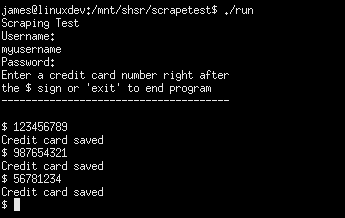
A dummy little program was written in C.  All it did was store a username and password (entered using getpass() for increased security) along with a series of credit card numbers that are "swiped" into the system.

insertion.png
Swiping cards
We then find the PID of this running process just by ps aux | grep scrape (the program is named scrape, but it may be something like POSSwiper for example)

get pid.png
Getting the PID

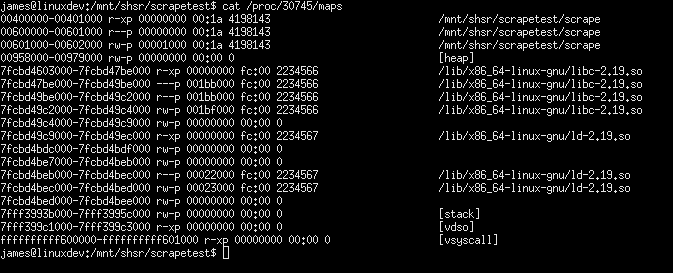
Now we can get all the memory regions and maps used by our processes.  The /proc directory gives us a hand there.

dump maps.png
/proccing to analyse the memory

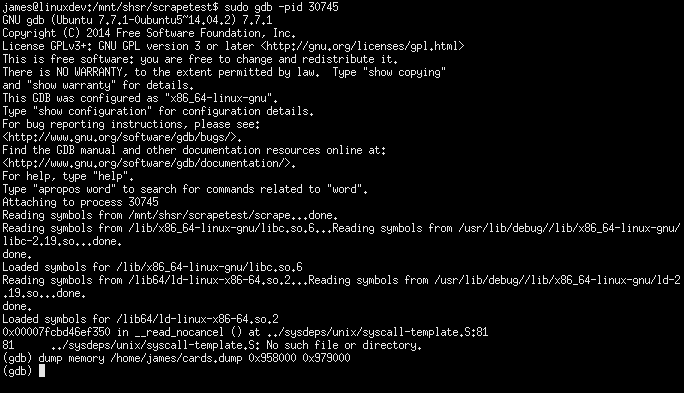
We are interested in the heap space of our program which shows up nicely in the fourth line;  ranging from address 009580000 to 00979000 (both hex).  Next thing we do is fire up the actual scraper (which is, in our case, a kitchen knife.  A legitimate gdb debugger).

gdb dump.png
Dumping memory in just one line!

GDB shows a bunch of text; we're only interested in how we started it (gdb -pid <PID>) and how we stole the memory (dump memory <to where> 0x958000 0x979000)  As you can see, using the exact heap space memory range we got from /proc.  The memory will be dumped to the file we choose.  Of course, this requires administrator rights, but as one might expect, tens and hundreds of POS devices will most likely share the same password, and will probably have the default one too (such a typical case of a security breach - I found the password to my ISP's router on a public forum...).

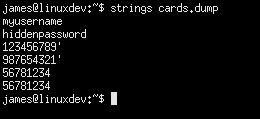
Now, onto the next step - the analysis, if you call it that.  Data dumped into the file is from RAM, so as expected it is binary.  Linux simplifies this analysis by providing another tools - strings.  All it does is see what's in a file and spit our all the strings it could find.  That's it, so we pass the dump to it and we get a nice list of string, including the password (you didn't see it in the first screenshot because of getpass()) and all the numbers and everything.

acquire strings.png
The gold mine

That is all.  Now go and whitelist the list of processes on your system, before someone gets to scrape the memory off it.

06 October, 2015

Some points on the Android UI

Android is a great OS - there's no doubt about that, even if you measure that statement using the number of active installations.  It has an interesting history, starting from plans to create an OS for digital cameras and ending up being Google's core mobile platform running on around a billion devices.  It is technically well designed, open source and very adaptable; from CPU architectures to screen sizes, Android can adapt.

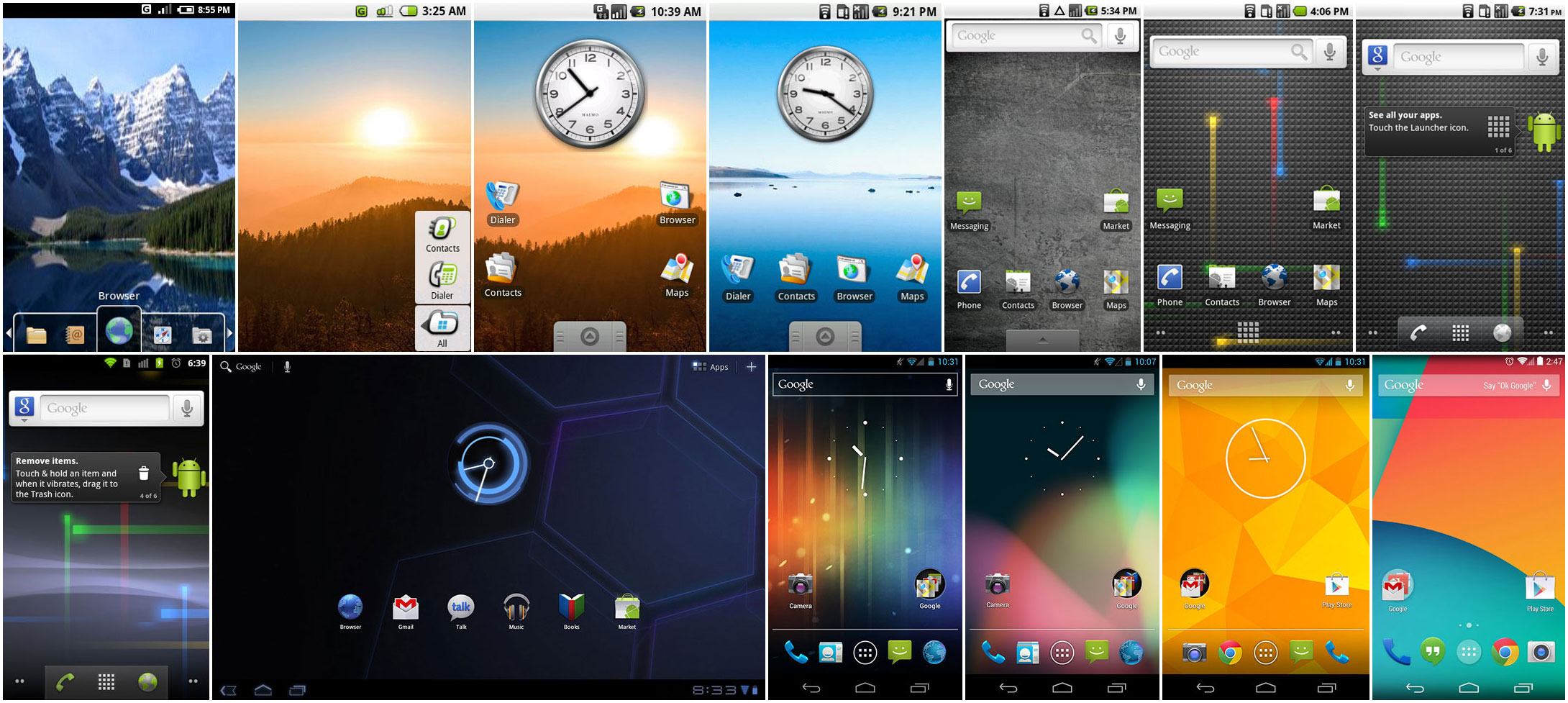
Progress of Android over the years (Ars Technica)


As Android progressed to meet the expected standards of the day, the general UI got more minimalist while more colours were introduced (older versions looked darker).  Despite the move towards a more modern UI in general, it is still possible for application developers to apply their own style.  A typical result of this support was that developers of older applications did not bother updating their styles to the latest version (this is basically an XML file).

What we ended up with is a FIAT 127 in 2015's motorshow.
Not quite in the same league
The problem with this situation is that not only we have to sometimes use outdated applications, but Google is also pushing a new 'UI language'.  There is nothing wrong in having a new UI language...except when few developers are following it, and you're not one of them.  If Android is to have a uniform, clean and modern UI, there should be a mechanism which automates the transition of styles to the latest standard in cases where the default file was left lying around.  Automation is not uncommon on the Android ecosystem - Code is checked for potential errors, style files must be up to standard, even copyright issues are flagged by a bot - so why not a simple style file?
What's the deal with this UI (SIM Tool Kit)?


As I mentioned earlier, there is also another problem which Google does not seem to want to fix - Material Design.  Consistency is key in product branding and Google is/was known for their efforts in this regard.  The ubiquitous bar in all their web products and their logo in the exact same location made it clear that this is a Google product.


Nowadays, their Android apps are cacophony of UI element styles and whatnot.  Despite their efforts to make Material Design the next standard, it's already been 2 years and I have no idea when this next will be now.  It can be seen in some apps, such as the settings, and the major Google apps.  However, applications such as the Google Analytics still sport the Android 4.3 UI.  Even worse is the app for Blogger - with UI probably designed by the Romans.

Yet again, even though the apps follow the general material design, all of them seem to have a language of their own.  One aspect which was recently highlighted was the lack of consistent scrollbars.  Now we got a new scrollbar in the application launcher too, for diversity.

Google Calender app has to be one of my favourites.  It's fast, visually appealing and above all, useful.  I use it regularly to set appointments, reminders, etc. just like all other users.  The problem with the whole Calendar ecosystem is the web version.  Why has Google introduced the Material Design, implemented it correctly in Calender on Android yet left the web version in the dark while at the same time it developed the Inbox service with correct material guidelines on both Android and the web (I'm not discussing whether Inbox is practical or not)?  I understand the drive towards mobile and I truly appreciate the improved UI on mobile, but I'm not in favour of sheer inconsistency (and then again, there are web versions better than their apps).

Yes this was quite a rant - not really helpful for many.  But it gets frustrating when you're working on your services and try to follow as many guidelines as possible to make your users happy.  Thankfully apps are not accepted or rejected based on their looks and interaction, although sometimes I do favour such a system as it does improve the users' mobile experience.