Showing posts with label web. Show all posts

09 October, 2015

Java Programming Tutorial - Unit 0 - The Basics

Unit 0?  If you're new to this world, it might seem odd, but you'll see why we start 0.  If not, well you probably might skip this post for now.

If you decided to stay and read on, then welcome to the world of computer programing, where media reports are exaggerated and computers are very dumb ;)

A brief intro to programming

Cheesy Java code
Programming is "the act of instructing computers to perform tasks".  Computers don't get it when you tell them "write text".  What they do understand however is a series of bits, which ultimately lead to the text being written.

I'm not going into the great detail about the origins of programming, however the following is a very brief overview to put you in context.

The first computer programs consisted primarily of punch-card.  These were the earliest forms of bits, holes to represent 'on' or '1' and solid wood for 'off' or '0'.  As time went by, digital valves were used and nowadays we use semiconductors and integrated chips.  The concept has remained the same though.  Writing ones and zeros is of course complex, so much so that no one has ever actually programmed in ones and zeros.  What they did do was devise a system to write meaningful text and then convert it to ones and zeros.  For example, the earliest code, in Assembly Language, would have looked like this


It is complicated, unless you're an engineer in the 50's (although it's fair to note that it is still used today for very specific reasons).  The development of programming languages was just like this exact case.  A language becomes too unwieldy (projects gets larger and reaches the practical limitations of the language), so a new higher level language is created to cater for new features.

The next language then uses a single command to represent a group of lower level commands.  As you might expect, it is vastly more complex than just wrapping the lower level, but you get the idea.  A tool that converts the high level language to the lower level is called a compiler.

Once computers became mainstream, more and more different kinds of architectures were created.  An architecture is a CPU design which usually has its own machine language (the way 1's and 0's are organised for it to understand). As each CPU typically understood different instruction sets, different compilers were written to "wrap" architecture-dependent code.


Now the next problem was that it's not as simple as writing the code once and compiling it for each architecture.  The code usually had to be modified for each system it was intended to run on, so portability was lost.  Having a large project would render this process impractical so a new language came along that tried to solve this problem once and for all.

Java

Java was a language developed in 1995 by what was once Sun Microsystems (now Oracle).  What's interesting about Java is that it is much more than just a language.  Java is a whole ecosystem, having the language syntax, compilers, environments, SDK and community.

Duke, the Java mascot
But how did it solve the portability issue?  As I mentioned, it is a whole ecosystem so there is a more elaborate system at play.  What Sun did was create a language that is then compiled to a byte code rather than machine code.  This byte code is then executed by the Java Virtual Machine (so, yes, it's still machine code, but a different kind of machine).  This JVM is the only part which is differently coded and compiled depending on the architecture.  

So we now have a language which can be written and compiled just once and being confident that it will run on any kind of CPU as long as the JVM exists for that CPU.  This VM is also known collectively as the Java Runtime Environment (JRE), of which the byte code interpreter plays a major role.

Along the years Java was prominent on the web in what are knowns as applets.  Nowadays with the emergence of HTML5 and JavaScript (which has a relation of 0% to Java, so don't get confused), applets have become a thing of the past.  Java is also popular on desktop applications, mobilephones, TV set top boxes, DVD players, etc.

Java today

Java has a very strong community and many standards go through what are known Java Specification Requests (JSRs ), much like Request For Comments (RFCs) if you're familiar with network protocols.  Basically this is a process for definitions of ideas, standards, protocols, etc.

Through this process, Java has become arguably one of the top languages for high end websites (technically known as web apps).  Twitter for example, runs on Java, so you get the idea of the strength of Java.  Throughout this series we shall cover, quite in depth, how to write enterprise web applications in Java.

Java used to, and still does in a revived way, dominate the mobile aspect to.  This sheer adaptability, from top range servers to mobile phones, without doubt, makes Java the most versatile language ever.  In the early days of smartphones, Symbian was the king of mobile operating systems.  It used to run a version of Java known as J2ME (Mobile Edition).  Today the Operating System with the largest active user base is Android.  Surprise surprise, apps written for this OS are also in Java and use almost the exact same tools - it's a bit more complex - but we'll see as we go along  how seamless it is to adapt your Java code to it.


Next Steps

So now you have a very basic idea of what programming is and how Java relates to it.  Of course, a lot more resources can be found elsewhere if you're interested in more history and details.  Wikipedia is one of those sites so you can head over there to further whet your appetite.

Following this post we shall start off with a basic Java environment set up; from the quick installation to your first Hello World! 

08 October, 2015

Accelerated Mobile Pages

Browsing the web from our phones is nowadays a common thing.  In fact it is now likelier to browse from your phone than from a desktop computer.  Personally, I find myself using a desktop browser only while I'm at work or while doing some desktopy thing (such as coding or messing with VMs and networks).  If I'm just browsing during the evening, for instance, its 99% from my phone.

My preferred way of browsing is via the forum kind of applications, such as reddit or hacker news, so at that point I'm not really using a browser.  However, the majority of the content is delivered from websites so you see and interesting title, tap on it, and the in-app browser or the main browser is opened.  This typically works fine, until the site you're accessing is a megalith and takes tens of seconds to load.  After at most 3 seconds, if barely any content has loaded, the link is forgotten and I move on the the next link.  That's it.

The problem is that these websites are offering too many features for them to be practical on a smartphone.  Sometimes websites take even longer because they need to load the comments section, then come the suggested posts, with ultra big resolution images, followed by the author's biography...  It's unnecessary, I just want to see content.

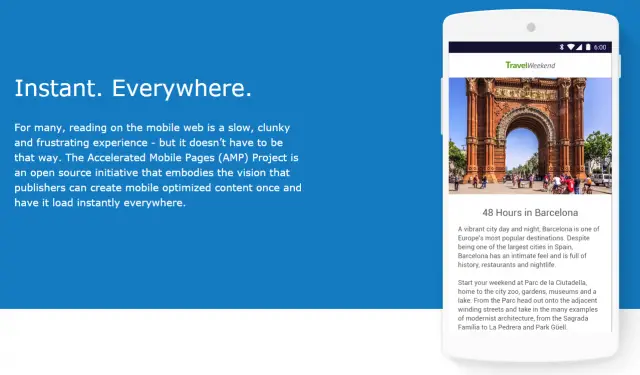
A team of internet companies, including Google, have come up with Accelerated Mobile Pages (AMP).  It is primarily a technological development (not exactly unheard of, as we'll see), but  through its restrictions it tries to limit the amount of unnecessary crap on pages.  As I said, it's a development, however much of this development is in terms of standards and rules rather than faster networks, or something like that.

In fact ,the focus is on basically banning a whole bunch of heavy and also some outdated HTML elements.  Unsurprisingly, no more <applet>, no more <frame> and no more <embed>.  There are also strict limitations on JavaScript, however the most surprising (but great) banned elements are <input> and <form> (with the exception of <button>).  It may not directly impact immediate performance of HTML, but it will surely stop developers from adding useless "post a comment" forms.

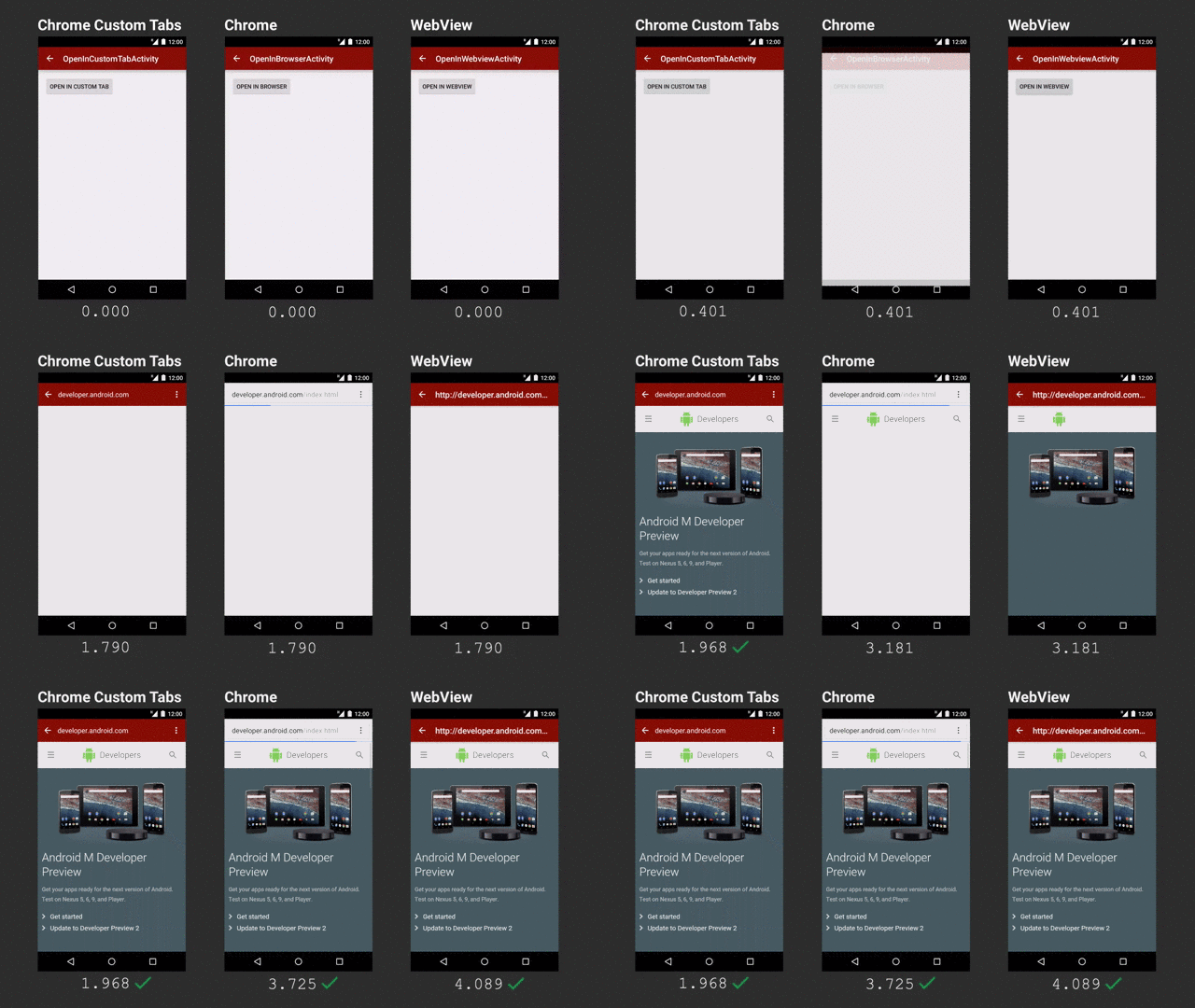
The focus is primarily on immediate content.  If I get a link while chatting and I open it up, I don't have more than 3 seconds to read the title and move back to the chat.  Thankfully, on Android, this experience shall now improve with the new chrome tabs introduced in Marshmallow.  It's a technical thing, but basically it avoids having to use either an in-app browser (which is isolated from your standard chrome) or opening up chrome (which is slow).

Chrome tabs are much faster, at least in this demo (via Ars Technica)

But let's get back to AMP.  As I said, it is content that the majority wants, so in this age of platform webapps, single-page sites and all the rest, simplicity, again, trumps features.  Despite the lack of features, static areas of a website are hugely important.  If you're interested, here's a short how-to, however it is fair to note that static this time is mostly client side, so no JavaScript - which means you'll probably need server-side processing if you have "dynamic" content.

AMP avoids the common JavaScript the web is used to and realises the idea of Web Components.  These do have JavaScript under the hood, but since they are managed differently, it makes the page load faster without synchronous blocks by JavaScript.  AMP also restricts inline styling, conditional comments and some CSS attributes (although CSS is not so limited compared to JS).

As yet, (being days or hours since being announced) I personally do not consider this as a major breakthrough technologically - it's only a set of rules to reduce the bloat on webpages who primarily host content.  However, I am very glad with the way things are going and I do hope it gains traction.  

The benefits I see are greatly improved user experience with much faster load times and no nonsense web pages along with better development.  The more modular the pages, due to web components, the easier it is to develop.  There are no messy inline styles or randomly placed JavaScript.  Things are put in their place and the rules are strict - otherwise you'll not qualify for AMP and your page won't make it to the top of search results.  

Unfortunately, I don't have that much control on this blog, otherwise I would have AMP'd it right away!

For further details, there are quite some resources:

06 October, 2015

Some points on the Android UI

Android is a great OS - there's no doubt about that, even if you measure that statement using the number of active installations.  It has an interesting history, starting from plans to create an OS for digital cameras and ending up being Google's core mobile platform running on around a billion devices.  It is technically well designed, open source and very adaptable; from CPU architectures to screen sizes, Android can adapt.

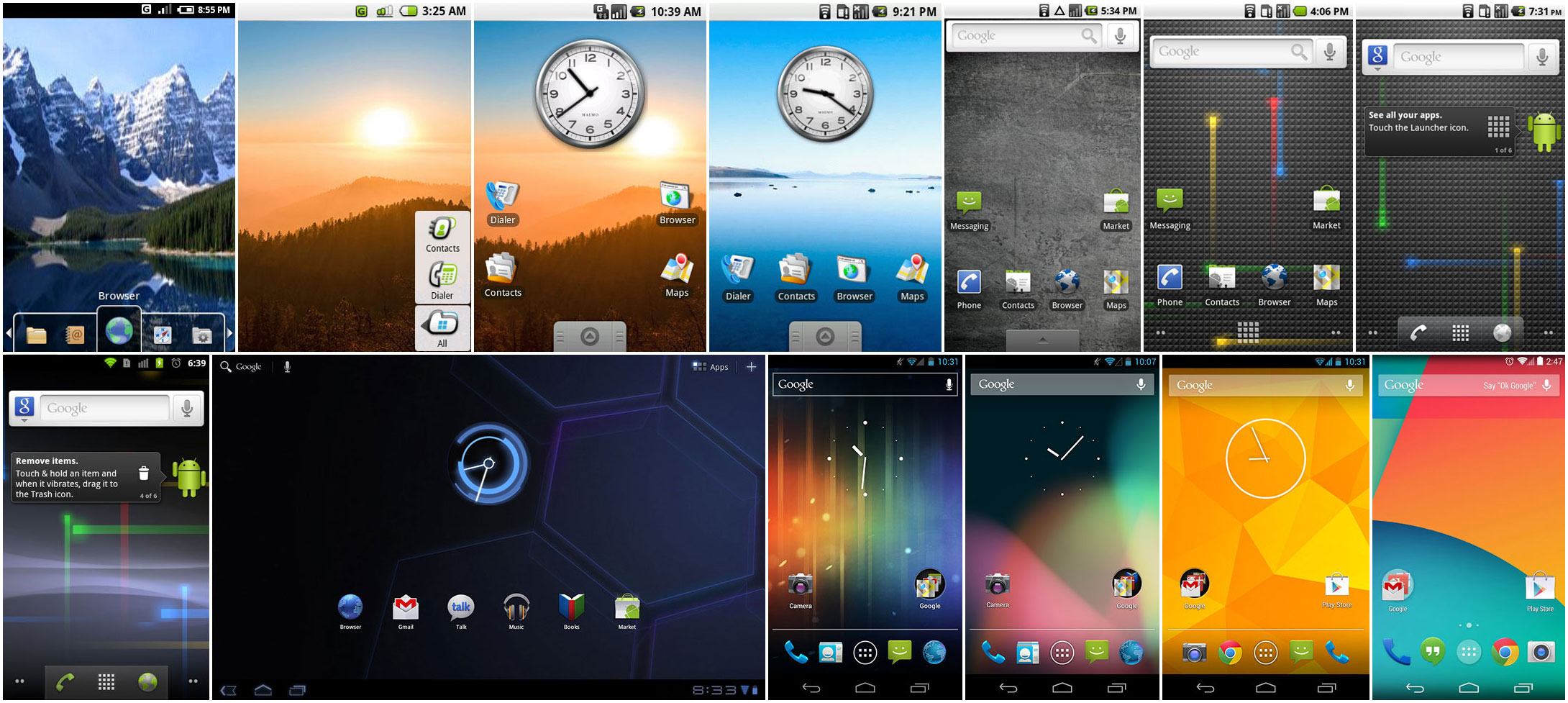
Progress of Android over the years (Ars Technica)


As Android progressed to meet the expected standards of the day, the general UI got more minimalist while more colours were introduced (older versions looked darker).  Despite the move towards a more modern UI in general, it is still possible for application developers to apply their own style.  A typical result of this support was that developers of older applications did not bother updating their styles to the latest version (this is basically an XML file).

What we ended up with is a FIAT 127 in 2015's motorshow.
Not quite in the same league
The problem with this situation is that not only we have to sometimes use outdated applications, but Google is also pushing a new 'UI language'.  There is nothing wrong in having a new UI language...except when few developers are following it, and you're not one of them.  If Android is to have a uniform, clean and modern UI, there should be a mechanism which automates the transition of styles to the latest standard in cases where the default file was left lying around.  Automation is not uncommon on the Android ecosystem - Code is checked for potential errors, style files must be up to standard, even copyright issues are flagged by a bot - so why not a simple style file?
What's the deal with this UI (SIM Tool Kit)?


As I mentioned earlier, there is also another problem which Google does not seem to want to fix - Material Design.  Consistency is key in product branding and Google is/was known for their efforts in this regard.  The ubiquitous bar in all their web products and their logo in the exact same location made it clear that this is a Google product.


Nowadays, their Android apps are cacophony of UI element styles and whatnot.  Despite their efforts to make Material Design the next standard, it's already been 2 years and I have no idea when this next will be now.  It can be seen in some apps, such as the settings, and the major Google apps.  However, applications such as the Google Analytics still sport the Android 4.3 UI.  Even worse is the app for Blogger - with UI probably designed by the Romans.

Yet again, even though the apps follow the general material design, all of them seem to have a language of their own.  One aspect which was recently highlighted was the lack of consistent scrollbars.  Now we got a new scrollbar in the application launcher too, for diversity.

Google Calender app has to be one of my favourites.  It's fast, visually appealing and above all, useful.  I use it regularly to set appointments, reminders, etc. just like all other users.  The problem with the whole Calendar ecosystem is the web version.  Why has Google introduced the Material Design, implemented it correctly in Calender on Android yet left the web version in the dark while at the same time it developed the Inbox service with correct material guidelines on both Android and the web (I'm not discussing whether Inbox is practical or not)?  I understand the drive towards mobile and I truly appreciate the improved UI on mobile, but I'm not in favour of sheer inconsistency (and then again, there are web versions better than their apps).

Yes this was quite a rant - not really helpful for many.  But it gets frustrating when you're working on your services and try to follow as many guidelines as possible to make your users happy.  Thankfully apps are not accepted or rejected based on their looks and interaction, although sometimes I do favour such a system as it does improve the users' mobile experience.

02 October, 2015

Hosting static websites on AWS S3

Hosting websites nowadays has become quite simple, easy and affordable.  Years ago you would try to find free hosts which would allow you to upload a few files and you're done.  GeoCities and freewebs were some of the most popular of these services.  As time went by, the data centre landscape has changed dramatically and the current situation is big companies offering extremely cheap hosting services.  The market is so huge that the classic "brochure site" has become almost free to host while still enjoying world class availability and scalability.

Static websites are the simplest form of site.  These are just a set of HTML pages linked together via links.  No complicated code, no weird configurations - just plain old files.  Depending on what you want, such a site may be ideal (maybe you do all your business transactions over a facebook page and use the site just as a brochure).


This of course has the advantage of being simple, easy, cheap and can be up and running very quickly, including development time.  It lacks, however, some of the major features you may want, such as a member's area, blogs and news, user-generated content etc.  But then again, you might not want these extra features.  In that case, here is a simple, short and sweet guide on how to host your site on Amazon Web Services.  There is no doubt that it is currently the leader in cloud services and it would be wise to use their services.

1. Get A Domain

The first thing you need is the dot-com.  You may use or favourite registrar or just randomly choose one from these that come to mind: noip.com, namecheap.com, godaddy.com.  If this is your first time you may want to read up on registration etc. but all you need is to find a domain that is available, buy it, and configure it as explained later.  Make sure you do not buy hosting with it, as some providers will try to bundle them together.  Well you can do whatever you want, but it's not necessary in this case.

2. Sign Up with AWS

Log on to aws.amazon.com and sign up for an account.  Choose your region, etc and keep going until you get to the main control panel.

3. Hold your horses!

The control panel may be overly complicated.  It isn't, though.  The number of services may be overwhelming, including the names, but we'll get through.  Only two services are required in our case.

Cloud providers typically offer more than just simple hosting.  Keep in mind that big enterprises are running their businesses here too, so this complexity is to be expected.  One of the core offerings of a cloud provider is storage.  Storage keeps everything in place - services need to save their logs, applications exist in storage, databases are persisted to storage...you get the pattern.  Again, due to the enterprisiness of this offering, the storage services have their own terminology.

Your usual "hard-disk" or "USB drive" (or floppy disk) is known as a bucket.  You have a bucket in the cloud in which you put your files.  Amazon offers storage in a service known as S3 - Simple Storage Service.  These bucket also tend to be dirt cheap.  A site a less than 10 pages and low to moderate traffic may cost you no more than €1 a month.

4. Creating the site

Now that you know about the basic concept, it is time to create the storage for your site.  In this example (and pretty much any other tutorial out there), we shall use the example.com domain.  Whenever you see this written down, replace it with the domain name you bought.  Do not prepend it with "www."; that is a subdomain, not the proper domain that you bought.

4.a. Sign in to https://console.aws.amazon.com/s3/;
4.b. Create a bucket named example.com;
4.c. Create another bucket www.example.com (with the www);
4.d. Upload your content to the first (example.com) bucket;

What we'll do is host the site on the example.com bucket and redirect any traffic coming in to www.example.com to it.

5. Prepare the site

Now you'll need to allow the public to access your buckets, otherwise they'll be forbidden from seeing your content (which, presumably, you want to be publicly accessible).  All you need is to attach the following bucket policy to your example.com bucket.  Again, make sure you replace example.com with your domain.

5.a. Set the policy
{
  "Version":"2012-10-17",
  "Statement":[{
"Sid":"AddPerm",
        "Effect":"Allow",
 "Principal": "*",
      "Action":["s3:GetObject"],
      "Resource":["arn:aws:s3:::example.com/*"
      ]
    }
  ]
}

5.b. Set up as static website by clicking on the bucket and select the Static Website Hosting section.  Choose the 'Enable' option;
5.c. Name the index page.  This is the "homepage" of your site.  Typically this is named "index.html" or similar;
5.d. Test the page by entering the Endpoint URL shown to you in your browser, just to make sure it is accessible;
5.e. Select the second bucket (www.example.com) and in the same section choose to redirect requests.  In the input field, enter your domain (without www.);

6. Wire it up

Another service that is required to properly route traffic to our site is Route 53.  As you've seen, you endpoint is appended with a much longer address belonging to amazon.  You wouldn't want to distribute that URL to your clients, after all you bought your own domain.

Route 53 is basically a DNS service - an internet directory for converting example.com to a number that the internet understands.  You do not need to do any of this works, except how to inform the registrar about your shining new website on AWS.  Here's how:

6.a. Open up https://console.aws.amazon.com/route53 and create a hosted zone for your domain (no www.) - Click Get Started Now under DNS Management, or just go to Hosted Zones and then Create Hosted Zone;
6.b. In the details section you'll see a Delegation Set - a list of addresses.  Write these down somewhere, we'll use them later on;
6.c. Click Create Record Set and enter you domain name.  Mark it as Alias and from the Alias target select your bucket.  Do this also for the www.example.com (point it to its own bucket).

7. Finishing

Now that everything is set up on AWS, all you need to do is inform the domain registrar (the site from where you bought your domain).  Remember the 4 addresses in the Delegation Set?  These will now be used to configure the DNS addresses for your domain.  What you need to do is log in to your domain registrar control panel and configure your domain.  Somewhere you should be able to change the DNS settings for it.  Not all providers have four fields - there may be more, there may be less.  Enter all four addresses in the delegation set in the domain configuration.  If there are less than four fields, that's it.  If there are more than four, leave the rest empty.

8.  Live!

Now that you're done, you may need to wait a few minutes until the DNS settings are updated.  This is not related to your site on AWS but on the nature of DNS - i.e. people's ability to enter example.com and be properly taken to your site.  These may take up to 48 hours, but in my case it was only a matter of minutes.

Hope you found this helpful!

29 September, 2015

Intelligent Input Processing

Hello again after quite a long time!  Quite a lot has happened over the past few years, from starting and graduating from University, finding a job in another company and travelling around the world.  I have also been involved in some small side projects, some of which have actually gained some traction.

One such project which I did some basic parts of is a a system for maintaining a list of classified vehicle listings for used (2nd hand) and new cars...or any other kind vehicle.  The interesting part is the way a new listing can be added with minimal effort.  Typically people *hate* filling long forms, and entering the details of a car is no exception.  Even if the form is actively trying to help the user by showing suggestions, it still is not as streamlined as just typing text or actually filling out a hand-written form.

So here I found the thing I hated about forms - having to switch between inputs and having to think about the value I should enter next.  I don't want to think about it, I just want my form to fill up, by itself if possible.  A little experiment lead to the development of a small but quite helpful feature which tries to offload this (minor) effort from the user.

As the data was a simple table, we could predict what the user is going to enter; some details on a car.  There aren't too many attributes when you think about it - a make and model, year, colour, engine and transmission.  You could also do away with some of them, even though it might hurt search rankings.  The result was that a form may be populated by simply parsing the semi-natural text taken from one big text box.  The user no longer had to enter different and specific values in each entry - just one descriptive sentence where order does not matter and mistakes may be easily fixed.  All we needed is some initial data to "teach" the system what to expect.

We now have a very clean solution for entering listing details where a short description relieves us from having to think about each individual attribute of a car (what an epic case of 1st world problemism).

By some luck, this little experiment has made it through to a website and is now available for many users to enjoy.  Let's hope these kinds of little experiments from professionals and enthusiasts keep getting better and more popular so one day we may have a more user-oriented internet, rather than a machine-oriented one.  Oh by the way, the website making use of this little tech is http://www.pickacarmalta.com!

06 December, 2011

Google Graphs

I remember when I was studying maths and had to draw graphs, the task was not really difficult, but admittedly, I never really managed to draw perfect graphs.  But anyway, if I ever had some problems or if I just wanted to ensure that it was correct, I would go to Wolfram Alpha, put in my equation, and get an artistic graph, complete with differently coloured lines, zooming in and out, and fancy features which would eventually end up taking 10 minutes just because I liked watching my graph getting twisted by entering in random numbers and symbols.

Now though, with Google basically having it's own version of everything, from operating systems to social networks, there is new option.  One can now just type in an equation a nice graph is rendered along with other search results :D  I don't really need it but I think it is quite helpful for getting and idea of how a graph looks like.

It's got great features too; multiple graphs (separated by commas) each having a different colour, the solution, zooming, dragging and well some other details which I think I should leave up to you to find out :D